From Download Clients to Browser Play
From download clients to browser play, trace how casino game access shifted and learn to read the visible handoffs without mistaking them for technical proof.
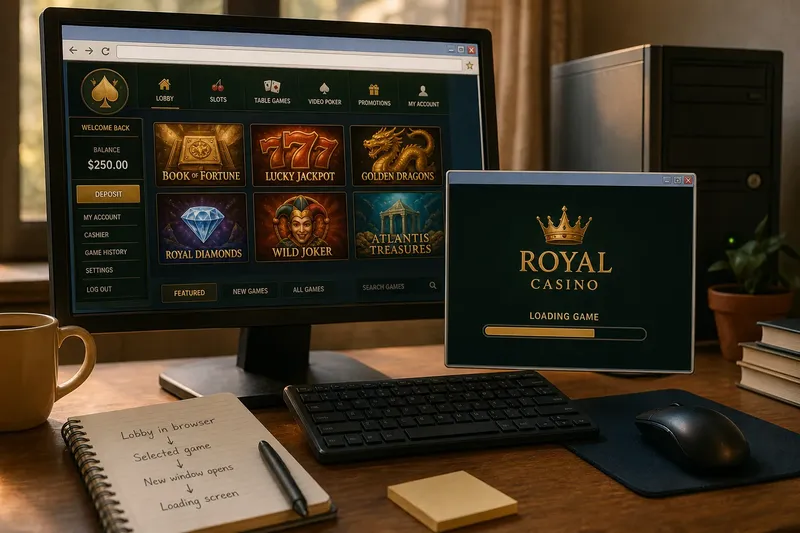
What does a browser window actually tell you about how an online casino game arrived on screen? From download clients to browser play, the history is easiest to read through the small transitions a player could see: an installer, a lobby, a loading panel, or a new window.
Client-era entry
In a desktop client, the operator’s application was the front door. A player might install the software, sign in, browse a lobby of game tiles and open a title in a panel or separate window. The client made the casino itself feel like a distinct destination on the computer, rather than a page among browser tabs.
That doorway shaped the whole session. The lobby, account controls and game selection could sit within the same branded application, while system prompts and client updates appeared outside the ordinary rhythm of web browsing. For a historical account, those visible boundaries matter more than an unsupported guess about where the game’s files were stored.
Browser transitions
As browser delivery became more familiar, players could often reach a lobby through a web page and start a game without opening a dedicated casino client. The change was not a clean swap from “installed” to “online”. A browser could still call on plug-ins or supporting components, and a game launched from a page could move into a new tab or window.
The historical shift is therefore a change in the route the player had to manage. An operator’s separate application might give way to a browser tab as the place where the session began, while the game itself still appeared behind another loading layer or handoff.
Visible clues
Follow the screen in order instead of assigning a technical label too early. A useful description records what the player opens, what appears next, and where the game ends up.
- Starting point: If a desktop shortcut opens an operator application, describe a client entry route; if a web page opens the lobby, describe a browser entry route.
- Installation prompt: If an installer or system permission prompt appears, note that installation is part of the visible path; if neither appears, do not infer that no supporting software exists.
- Update screen: If the application presents an update prompt before its lobby, record that sequence; if a page simply reloads, describe the reload without claiming how updates are managed.
- Loading location: If a loading panel appears inside the page, note an in-page transition; if it appears in a new window, record the handoff and leave the delivery method open.
- Return route: If a game control returns to the lobby, describe that control; if the player uses browser navigation or closes a window, note the browser’s role.
- Device context: If browser controls or a client frame are visible, include them; if the image is cropped or compact, avoid classifying the format from appearance alone.
Say an archived capture shows a browser lobby, a selected game tile and then a separate window with a loading message. The account can state that the browser lobby handed the player to a second window. It should not claim that the game was locally installed or fully browser-based, because the capture does not show that.
Access trade-offs
A client offered a recognisable place for games and account features, but it asked the player to install and maintain a separate application. Browser play kept more of the entry route within a familiar page, though the page could still prompt for support software or send the player elsewhere to finish opening a game.
Not worth the effort: trying to reconstruct every hidden software dependency from a still image. Unless the question is specifically about architecture, that work can distract from the better-supported history of what a player had to open and what appeared next.
Browser play questions?
Did browser play mean no software?
No. It could remove the need for a dedicated casino client while still relying on plug-ins, downloaded assets or other components. A browser launch alone does not settle how the game was delivered.
Why did clients remain in use?
A client grouped an operator’s games and account features in one application, which could make return visits familiar. That convenience also meant installation and compatibility were part of the experience.
Could a browser game open elsewhere?
Yes. A game selected in a browser lobby might load in the current tab, a new tab or a separate window. Describe the visible handoff rather than treating the starting page as proof of the game’s underlying format.
Can a screenshot date an interface?
Browser controls, plug-in notices and operating-system prompts can provide context, but none gives a precise date by itself. An image may be reused or may show an older interface on a later device.
Read the sequence
Keep observation separate from interpretation: “a client update prompt appears before the lobby” is visible; “the game was stored on the computer” is a further claim. The same discipline applies to browser pages, loading screens and separate windows.
From download clients to browser play, the telling historical detail is often the boundary between the operator’s application, the browser and the game window. Describe that boundary—and what the screen cannot establish—and the player’s changing route becomes clear without pretending the interface reveals more than it does.